Track Your Net Worth.
Keep Your Privacy.
Your portfolio. Your device. Track investments offline without linking accounts — up and running in 2 minutes.

The Problem With Every Other Tracker
Most portfolio trackers ask for your brokerage credentials. They connect through aggregators like Plaid and Yodlee, routing your login details through third-party servers you have never heard of.
Your holdings, your balances, your entire financial picture — sitting on someone else's infrastructure, funding someone else's business model. One breach and it is all exposed.
You should not have to trade your privacy to track your portfolio.
A Different Approach
Built from the ground up so your financial data never leaves your hands.
No Credentials Required
Never share your brokerage login. You enter your holdings manually — no aggregators, no third-party access to your accounts.
Local by Default
All your data is stored on your device using iOS Data Protection. Nothing is transmitted anywhere unless you choose otherwise.
Your iCloud, Optional
Want to sync across devices? Enable iCloud sync. Your data goes to your private iCloud database — encrypted with your keys, not ours.
Everything You Need
Powerful portfolio tracking without compromising your privacy.
Net Worth Dashboard
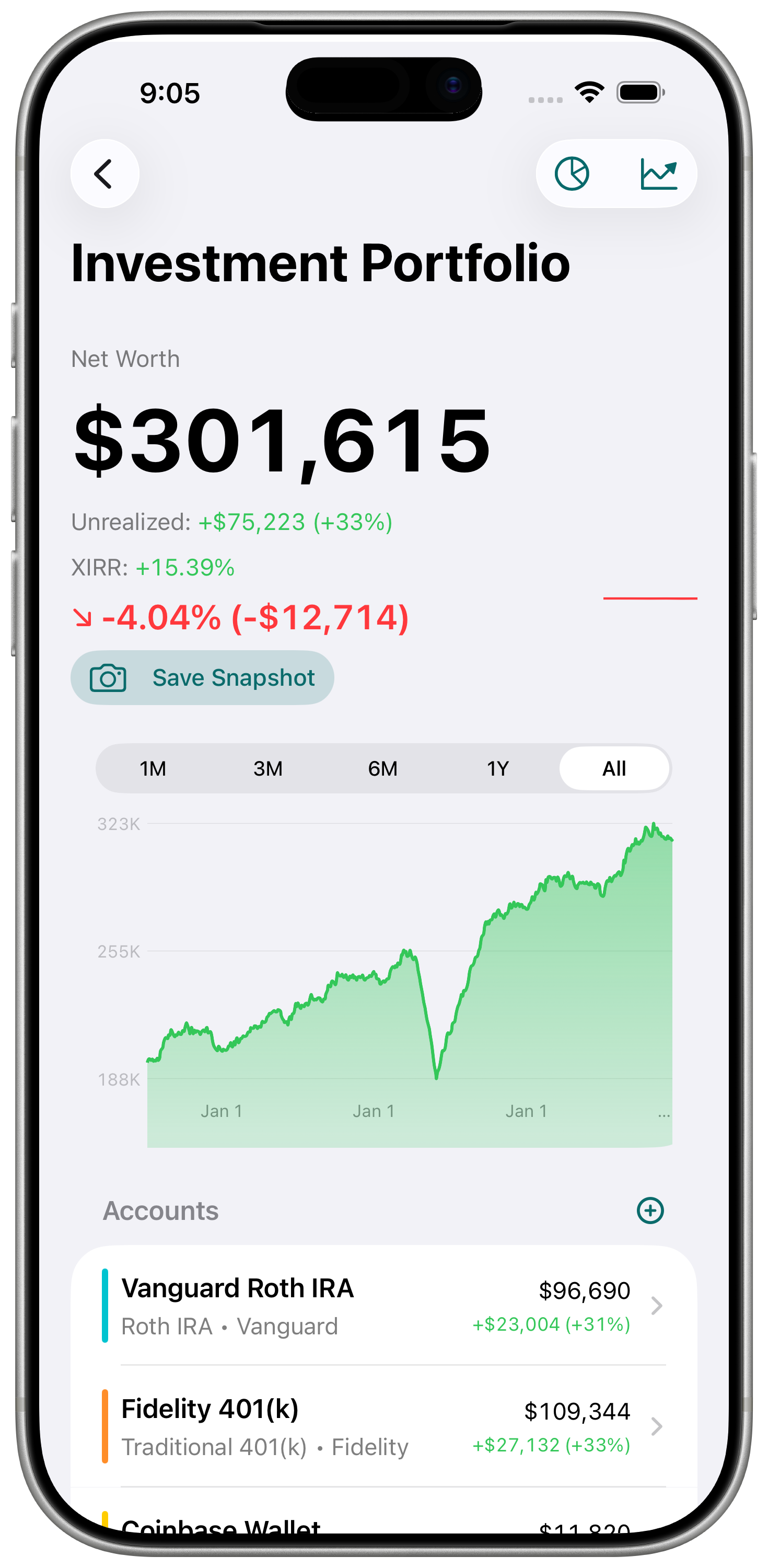
See your total net worth across all portfolios at a glance with real-time breakdowns.
Interactive Charts
Visualize performance over time with interactive line charts and historical snapshots.
Asset Allocation
Understand your diversification with clear breakdowns by account, asset type, and sector.
XIRR Returns
Calculate annualized returns using XIRR — the most accurate method for portfolios with irregular cash flows.
CSV Import
Import holdings from Fidelity, Vanguard, Schwab, DEGIRO, Trade Republic, and Scalable Capital. Automatic column detection included.
Gain/Loss Tracking
Track unrealized gains and losses across your holdings with percentage and absolute values.
Monthly Snapshots
Manually capture monthly snapshots to build your net worth history over time.
Example Portfolio
New to the app? Explore a pre-built example portfolio with real charts, allocation, and XIRR before adding your own data.
Free Tier Transparency
Usage badges show how close you are to free plan limits before you hit a wall — no surprises.
How It Works
Up and running in under two minutes.
Create a Portfolio
Name your portfolio — retirement, brokerage, crypto, anything you want to track.
Add Accounts
Add accounts within each portfolio to organize your holdings by institution or account type.
Enter Holdings
Add your holdings manually or import them via CSV. No brokerage login needed.
Track Everything
Watch your net worth, returns, and allocation update across your dashboard and charts.
Simple, Honest Pricing
No hidden fees. No data monetization. Just a fair price for a useful tool.
Free forever
- 1 portfolio
- 3 accounts
- 20 holdings
- 12 snapshots
- 90-day chart history
1-month free trial · or $79.99 lifetime
- Unlimited portfolios
- Unlimited accounts
- Unlimited holdings
- Unlimited snapshots
- Full chart history
Privacy by Design
Not a policy. An architecture.
Private Portfolio Tracker contains no code that transmits your financial data to external servers — because no such servers exist. Your portfolio data is written to iOS's encrypted local storage, protected by your device passcode using hardware-level encryption. If you enable iCloud sync, your data goes directly to Apple's CloudKit private database — a container tied to your Apple ID that even Apple cannot read without your encryption keys. We cannot access your data, cannot receive it, and cannot be compelled to hand it over, because we never have it.
- No account required to use the app
- No brokerage credentials ever shared
- No analytics or tracking of any kind
- No data monetization — subscriptions fund development
- All data stored locally on your device
- Optional encrypted iCloud sync with your keys
No bank connections. By design. Users who choose manual entry aren't settling — they prefer it. The monthly ritual of logging in, entering numbers, and watching the chart update is itself the practice. It takes 5–15 minutes. It keeps you in tune with your finances. And it's the only architecture that makes our privacy promise unbreakable.
| Platform | iPhone (iOS) |
| Data storage | On-device, local-first |
| Account required | No |
| Brokerage connection | None — manual entry only |
| iCloud sync | Optional, encrypted (CloudKit) |
| Analytics collected | Zero |
| Price | Free / $24.99/yr / $79.99 lifetime |
| CSV import | Fidelity, Vanguard, Schwab, DEGIRO, Trade Republic, Scalable Capital |
FAQ: Your Data
- Where is my data stored?
- On your device. If you enable iCloud sync, in your private iCloud account. We do not operate servers that store your data.
- Can you see my portfolio?
- No. We have no technical means to access data on your device or in your iCloud private database.
- What happens if I delete the app?
- All local data is permanently removed. If you use iCloud sync, your data remains in your iCloud account until you remove it.
- Do you sell data to advertisers?
- No. We collect zero data. Our business model is subscriptions, not advertising.
- Does it work offline?
- Yes — the app is fully functional without an internet connection. iCloud sync requires connectivity, but all core features work offline.
- Can I track cryptocurrency?
- Yes — add any asset manually. The app doesn't connect to exchanges, so you enter prices and quantities yourself.
- What happens when I reach a free tier limit?
- The app shows your current usage in Settings. You can continue reading your existing data, but adding more holdings or portfolios requires upgrading to Pro.
- How is this different from Monarch Money, Empower, or Copilot?
- Apps like Monarch, Empower, and Copilot require a third-party aggregator — typically Plaid — to connect to your accounts. That aggregator model requires sharing your banking credentials with an intermediary. Private Portfolio Tracker has no aggregator connection of any kind. Your data is entered manually; we have nothing to transmit and no way to share it. Monarch's allocation view groups holdings by instrument type rather than asset class — a frequently raised limitation in user reviews. Empower's account linking has created access disruptions for users during platform migrations. Copilot requires frequent re-authentication when bank security systems reset the connection.
- Can I track multiple brokerage accounts without connecting them?
- Yes. Pro unlocks unlimited accounts across unlimited portfolios, all managed manually.
- What happens to my data if I cancel Pro?
- Your data stays on your device. Nothing is deleted. You revert to free tier limits — if you have more holdings than the free tier allows, existing data is read-only until you reduce the count or resubscribe.
- How is this different from Wealthfolio?
- Wealthfolio is open-source and desktop-first, designed for self-hosting on a personal computer. Private Portfolio Tracker is a native iPhone app — optimised for iOS, distributed through the App Store, with optional encrypted iCloud sync.
- I've been using a spreadsheet for years. Why should I switch?
- You shouldn't if your spreadsheet works for you — and manual entry here works the same way. The difference: no formulas to break, no skill barrier to set up proper charts, and no risk of a decimal error in a XIRR formula. The asset allocation donut across all your accounts is the thing spreadsheets can't do well. Many users keep their spreadsheet and use this as a second opinion on their calculations.
Made for People Who Care About Their Data
Whether you are a Boglehead tracking index funds, pursuing FIRE, or finally replacing that spreadsheet — this is portfolio tracking that respects your privacy.
Download on the App Store